

Orders and operations
Multichannel TCG orders: a clear daily routine
Organise TCG orders from multiple marketplaces: check payments, identify copies, prepare picking and verify shipping details and inventory availability.
Updated September 30, 2026
The short answer
Track each order using its marketplace reference and payment status. Cardunity’s Orders section lists orders synchronised from connected channels: filter the list, verify the variant and quantity, then check shipping and tracking in the original channel. An order appearing in the list does not automatically mean it is paid.
When orders arrive from different marketplaces, the challenge is more than opening several dashboards. You need to identify the right card, avoid duplicate work and know which orders can be prepared. A shared routine also helps when work passes from one person to another.
You can use this process for a few orders a day and keep it as volume grows. The goal is to make each order's next step visible, without confusing a received sale with a shipment ready to go.
Start with the channel and payment status
Identify each order by its channel and original reference. Two marketplaces may use similar numbering, so a number alone is not always enough. Check payment status before beginning preparation.
If a sale is pending, cancelled or missing information, keep it apart from orders ready for processing. For payment or address questions, check the original channel's order details first. Do not assume an order is paid just because it appears in the list.
| Situation | Next check |
|---|---|
| Order received, payment pending | Check payment in the channel; do not treat it as paid |
| Paid, two copies requested | Match variant and quantity, then prepare two physical copies |
| Shipped, tracking missing | Check the existing shipment in the marketplace before taking further action |
Pick the variant, not just the name
During picking, compare set, collector number, language, condition and finish with the order. For graded or serial-numbered cards, also check the details that identify that specific copy. A photo can help, but it does not replace checking attributes.
For a sale of two copies, count two physical cards before closing the parcel. If you find an inventory discrepancy, pause that order and check availability and other channels: a rushed correction can hide the cause.
Make the work queue easy to understand
Group orders by operational step: to check, to pick, to pack and to hand to the carrier. These are working categories, not required marketplace status names. Keep the original order reference with each group of cards.
Cardunity's Orders section brings together orders synchronised from connected channels. Use it as a checkpoint and consult marketplace details when a specific check is needed. A unified view does not make every channel's rules identical.
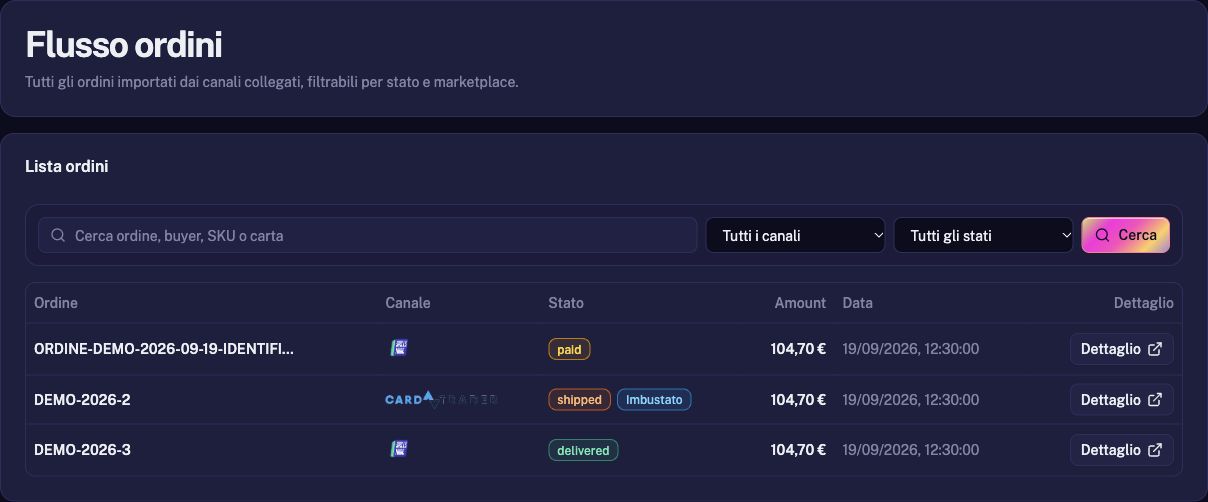
Complete the shipping and inventory checks
Before handing over a parcel, check the recipient, purchased service and tracking reference. Then verify that shipment status and card availability reflect what has actually been processed.
An order prepared on your desk is not yet a parcel handed to the carrier. Likewise, a synchronisation error should not be fixed by creating a second order. Start with the existing reference and identify the incomplete step.
The end-of-day check
Focus the last check on exceptions. This is where forgotten orders, missing copies and pending updates become visible. Record the next action so you do not have to rebuild the context tomorrow.
- Received orders compared with orders being processed.
- Pending payments and anomalies separated from ready shipments.
- Variant and quantity checked again for every parcel.
- Tracking and status verified in the original channel.
- An identified next action for any inventory or synchronisation error.